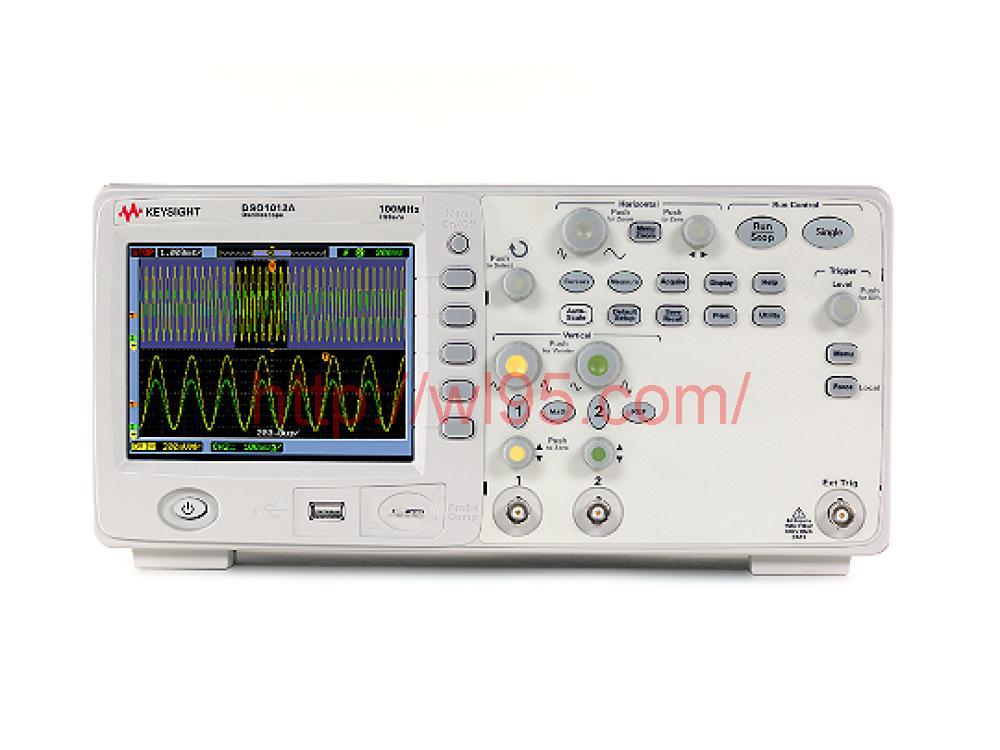


浏览次数:265
| 选件 | 是否计量 | 发货周期 | 保修时间 | 成色 |
|---|---|---|---|---|
| 否 | 1-4周 | 12- | 8成新 | |
| 所在地 | 机身号 | 状态 | 资料下载 | |
| 深圳市 | 完好 |
产品简介:
• 提供强大的信号捕获和显示、高级测量功能和加速的工作效率。
• 应用包括研发、制造业以及学校和大学的实验室站。
• 内置的 USB 主机和设备端口以及免费的 IntuiLink 软件有助于文档编制和 PC 连接。
• 用户可将波形和设置存储到 USB 闪存驱动器,轻松更新示波器固件,将文件直接传输到连接的运行 Microsoft Word 或 Excel 的 PC、打印到任何 PictBridge 兼容打印机。
• 购买者可下载的资源包括学生的示波器实验室指南和教程、教授的示波器基本原理幻灯片套件、探头负载实验和示波器应用说明。
产品特点:
• 观察更长时间、更深入的信号细节
• 配备同级示波器中*大的显示屏: 8.5 吋 WVGA 显示器
• 每秒 50,000 个波形的更新速率,业界居冠
• 深度内存: 100 kpts
• 集三种仪器的功能于一身, 执行更多测量具
• 同级产品中性能*佳的示波器
• 整合式逻辑分析仪( MSO )
• 业界仅有的内建式 20 MHz 函数产生器: WaveGen
• *的可全面升级示波器, 提供更多投资保护
• 升级能力: 采购示波器后,可视需求增加带宽、数字信道或 WaveGen 函数产生器
• 分段存储器
• 测量应用软件
• 模板测试
• 教育套件
Oscilloscope, 2-channel, 100 MHz
Agilent’s new 1000 Series oscilloscopes deliver the performance and features you expect in a big scope – and the portability and low price you require in a small one. We’ve redefined the economy scope by giving you more: more signal viewing, more capabilities and more productivity.
Capture long time periods with high resolution
All 1000 Series models provide up to 20 kpts per channel of convenient acquisition memory standard. The scope will maintain high-resolution acquisitions even at slower timebase settings so you can see the details on your signals.
See your signals more clearly
Every 1000 Series scope incorporates a bright, crisp LCD color display (300 cd/m2). You can quickly view your signal from almost any angle. Unlike conventional scopes that always require menus to be on, the entire 5.7-inch diagonal screen is available for waveform display as needed.
True Zoom mode for signal details and context
Dual display and True Zoom shows your entire signal and zoomed in waveform details at the same time.
23 automatic measurements
All 1000 Series scopes come equipped with 23 automatic voltage, time and frequency measurements. Press the Measure key to bring up the three you use most often or display all single-channel measurements on the screen simultaneously.
Sequence mode for easier debug
Record up to 1000 occurrences of a trigger event and then play them back to easily spot glitches or other anomalies for further examination. Store the waveforms to internal or external memory (USB fl ash drive).
Digital filtering on waveforms
Apply a real-time digital filter of your choice to the source waveform to eliminate unwanted frequencies from your display. Digital fi ltering selections include low-pass, high-pass, bandpass and band-reject filters. Frequency limits are selectable between 250 Hz and the full bandwidth of your oscilloscope.
Advanced triggering
Triggering options for the 1000 Series include edge, pulse width, composite video, pattern and alternate channel trigger modes. These modes ensure that you can capture and view hard-tofi find signal conditions.
Remote programming
For remote instrument control over the built-in USB interface, utilize Agilent’s I/O library or National Instrument’s instrument drivers for the 1000 Series scope in your application. The drivers take full advantage of industry-accepted standards and are compatible with many application development environments, such as Agilent VEE Pro, MATLAB, National Instrument’s LabView and LabWindows/CVI.
Make fast go/no-go decisions
Automatic pass/fail mask testing comes as a standard feature on all 1000 Series scopes. Acquire a “golden” waveform and defi ne tolerance limits to create a test envelope. Incoming signals will be compared to the allowable range and quickly flagged as pass or fail. This is ideal for manufacturing or service where you need to make decisions quickly.
Waveform math and FFT
Standard math functions include addition, subtraction or multiplication of any two input channels and Fast Fourier Transform (FFT) with four user-selectable windows (Rectangle, Hanning, Hamming and Blackman).
Multi-language interface
Operate the oscilloscope in the language most familiar to you. The built-in help system, graphical user interface, optional front panel overlays and user’s manual are available in eleven languages. Choose from: English, Japanese, simplifi ed Chinese, traditional Chinese, Korean, German, French, Spanish, Russian, Portuguese, and Italian.
Autoscale
Quickly display any active signals and automatically set the vertical, horizontal and trigger controls for optimal viewing with the press of the autoscale button. (This feature can be disabled or enabled for education customers).
Connectivity
Built-in USB host and device ports and free IntuiLink software make documentation and PC connectivity easy. Store waveforms and setups to a USB fl ash drive, easily update scope firmware and print to any PictBridge compatible printer.
Description


Copyright © 2007 All Rights Reserved. 深圳市晧辰电子科技有限公司 版权所有 [粤ICP备14101712号-1] [法律顾问]
公司地址:广东省深圳市南山区南山智谷产业园F座1402 邮编:518055