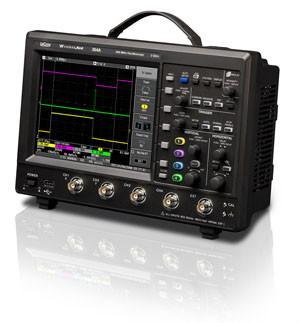


特点:
● 100MHz带宽
● 高达1GS/s的采样率
● 长波形存储器500 kpts/Ch
● 26个测量参数
● 重播历史模式
● 7.5"彩色显示器
● 多语言用户界面和帮助系统
● USB主机端口和设备端口,连接打印机和存储设备及实现PC遥控
● 可以选配GPIB和LAN连接功能
● WaveJet 300A提供了杰出的主打指标、功能和用户界面,简化了工作方式,缩短了调试时间。由于明亮的大型7.5"显示器、500kpts/Ch长存储器和高达2GS/s的采样率,您可以轻松捕获和查看波形的每一个细节。
● USB端口可以迅速保存波形,存储或打印屏幕截图,或连接到PC上。数学运算和测量工具可以帮助您了解波形,重播模式允许查看已经捕获的波形历史数据。这些指标、特性和功能结合在一起,使WaveJet 300A成为满足调试需求的优秀示波器。
● 长捕获时间
500kpts/Ch存储器消除了长捕获时间与高采样率之间的矛盾,在全部2GS/s采样率下实现了长捕获时间。长存储器使得WaveJet成为优秀的查看低频信号和高频信号或带有快速边沿的信号的优秀工具。
● 触发
除边沿触发外,WaveJet还提供了其它触发功能,包括脉宽触发、周期触发、脉冲数触发和TV触发,帮助您捕获需要查看的信号。
● 频率计数器
可以使用内置6位频率计数器,简化测试方式。WaveJet将一直显示计数器,而且计数器阅读起来非常容易。
● 波形数学运算
WaveJet为进一步分析提供了数学运算功能,提供的数学运算功能包括加法、减法、乘法和FFT。然后可以使用参数或光标在计算得出的波形上进行测量,提供进一步调试和分析功能。
● 自动测量
可以使用26个自动测量参数,节约信号测量时间。可以使用与被测通道相同的颜色代码查看结果。如果想更深入地查看信息,可以打开最小值/最大值统计功能,观察测量趋势。
● 重播模式
快速更新模式可以显示发生的欠幅脉冲和毛刺,但很难分辨这些事件发生的确切时间。重播模式可以在时间上向回查看波形,隔离这些异常信号,使用参数或光标测量事件,迅速找到问题的来源。
● 采集模式
峰值检测和等效时间采集模式可以灵活地捕获和测量信号。在使用峰值检测模式时,WaveJet可以捕获最小1 ns的毛刺,在使用等效时间采样时可以实现高达100 GS/s的采样率。
● 连接和通信
保存波形和屏幕截图是存档测量结果的重要组成部分。WaveJet有一个前面板USB端口,可以迅速把数据保存到U盘上;它还有一个后面板USB端口,用来打印硬拷贝。
后面板USB端口及选配的GPIB和以太网连接可以全面遥控仪器。
●力科Scope Explorer和ActiveDSO实用软件可以迅速控制WaveJet。
● 直观的用户界面,操作简便。
特性:
● WaveJet 300A系列提供了便携式示波器一般没有提供的一系列特性和功能。
● 它体积小,带有明亮的大型7.5"显示器,并提供了USB、GPIB和以太网连接端口。
1. 显示器
7.5"显示器可以简便地查看信号细节。它还为显示测量数据和菜单提供了空间,而不会使波形网格显得非常乱。
2. 开机时间
WaveJet不到三秒钟就可以开机投入使用。
3. 连接能力
可以使用安装在WaveJet前面的USB端口,简便地编制工作文档。您只需按前面板上的Print键,就可以把屏幕截图迅速保存到U盘上。
4. 便于携带
WaveJet体积小,仅厚4英寸,重量轻,可以简便地用于任何地方,即使工作台空间有限。
5. 自动设置
只需按一个键,就可以迅速配置垂直设置、水平设置和触发设置。
6. 辉度/重播控制
旋转控制波形辉度,或按下切换到重播模式。在重播模式下,旋转这个旋钮,可以查看WaveJet捕获的波形历史。
7. 活动通道指示灯
这些通道的LED颜色与显示屏上的每个波形颜色一致。垂直控制功能的活动通道一直亮起,以简化操作。
8. 按下式旋钮
按下Offset(偏置)旋钮,将自动清零通道偏置;按下Delay(延迟)旋钮,触发点将在屏幕上自动居中。
9. 本地语言用户界面
可以选择9种不同的语言。
● 重播模式隔离偶发事件
许多工程师发现,能够查看快速更新的波形非常重要,以便找到偶发事件或异常信号。这些偶发事件会在很短的时间内出现,然后消失。有了WaveJet,您可以轻松捕获并更仔细地查看这些事件。示波器高达3600 wfms/s的快速更新速率与重播模式相结合,可以向回查看历史数据,隔离和测量异常事件。
A. 快速更新速率,显示偶发事件
快速采集功能可以查看发生的欠幅脉冲,但还需要更多的信息,才能了解问题。
B. 隔离问题
向回查看波形历史数据。已经隔离了欠幅脉冲,现在可以测量这个信号。
C. 了解异常信号
向回查看1024个连续采集,可以看到重复出现的问题,了解它们是否以可预测的方式发生。
D. 解决问题
使用重播模式,查看欠幅脉冲前或欠幅脉冲后发生的事件,帮助您了解问题原因。
● 图示内容:重播存储器中多达1024个波形
Features:
100MHz bandwidth
● Sampling rate up to 1GS/s
● Long waveform memory 500 kpts/Ch
26 measurement parameters
Replay the historical mode
● 7.5" color display
● Multi-language user interface and help system
● USB host port and device port, connecting printers and storage devices and enabling PC remote control
Optional GPIB and LAN connection functions are available
The WaveJet 300A offers outstanding key indicators, functions and user interfaces, simplifies the working mode and shortens the commissioning time. Thanks to the bright large 7.5" display, 500kpts/Ch long memory and a sampling rate of up to 2GS/s, you can easily capture and view every detail of the waveform.
The USB port can quickly save waveforms, store or print screenshots, or connect to a PC. Mathematical operations and measurement tools can help you understand waveforms, and replay mode allows you to view the historical data of captured waveforms. The combination of these indicators, characteristics and functions makes the WaveJet 300A an excellent oscilloscope that meets the debugging requirements.
● Long capture time
The 500kpts/Ch memory eliminates the contradiction between long capture time and high sampling rate, achieving long capture time at all 2GS/s sampling rates. The long memory makes WaveJet an excellent tool for viewing low-frequency and high-frequency signals or signals with fast edges.
"Trigger"
In addition to edge triggering, WaveJet also offers other triggering functions, including pulse width triggering, period triggering, pulse number triggering and TV triggering, to help you capture the signals you need to view.
● Frequency counter
The built-in 6-bit frequency counter can be used to simplify the testing method. WaveJet will always display the counter, and the counter is very easy to read.
● Waveform mathematical operation
WaveJet provides mathematical operation functions for further analysis, including addition, subtraction, multiplication and FFT. Then, measurements can be made on the calculated waveform using parameters or a cursor, providing further debugging and analysis functions.
"Automatic measurement"
Twenty-six automatic measurement parameters can be used, saving signal measurement time. The results can be viewed using the same color code as the channel under test. If you want to view the information in more depth, you can turn on the minimum/maximum value statistics function and observe the measurement trend.
● Replay mode
The rapid update mode can display the underamplitude pulses and glitches that occur, but it is difficult to determine the exact time when these events happened. Replay mode allows you to view the waveform back in time, isolate these abnormal signals, measure events using parameters or cursors, and quickly identify the source of the problem.
● Acquisition mode
Peak detection and equivalent time acquisition modes can flexibly capture and measure signals. When using the peak detection mode, WaveJet can capture glitches as small as 1 ns, and when using equivalent time sampling, it can achieve a sampling rate as high as 100 GS/s.
● Connection and communication
Saving waveforms and screenshots is an important part of archiving measurement results. WaveJet has a front panel USB port, which can quickly save data to a USB flash drive. It also has a rear panel USB port for printing hard copies.
The USB port on the rear panel and the optional GPIB and Ethernet connections enable full remote control of the instrument.
The Lecroy Scope Explorer and ActiveDSO utility software can quickly control the WaveJet.
● Intuitive user interface and easy operation.
Feature:
The WaveJet 300A series offers a range of features and functions that portable oscilloscopes generally do not provide.
It is compact in size, equipped with a bright large 7.5" display, and offers USB, GPIB and Ethernet connection ports.
Display
The 7.5" display can conveniently view the signal details. It also provides space for displaying measurement data and menus without making the waveform grid appear very messy.
2. Startup time
The WaveJet can be turned on and put into use in less than three seconds.
3. Connection capability
The USB port installed in front of the WaveJet can be used to easily compile work documents. You just need to press the Print key on the front panel to quickly save the screenshot to a USB flash drive.
4. Easy to carry
WaveJet is small in size, only 4 inches thick, and light in weight. It can be easily used anywhere, even if the workbench space is limited.
5. Automatic Settings
With just one key press, you can quickly configure vertical Settings, horizontal Settings and trigger Settings.
6. Luminance/Replay control
Rotate to control the waveform luminance or press to switch to replay mode. In replay mode, rotate this knob to view the waveform history captured by WaveJet.
7. Activity passage indicator light
The LED colors of these channels are consistent with the color of each waveform on the display screen. The active channel of the vertical control function is always on to simplify the operation.
8. Press the down type knob
Press the Offset(offset) knob to automatically reset the channel offset. Press the Delay knob and the trigger point will be automatically centered on the screen.
9. Local language user interface
Nine different languages can be chosen.
● Replay mode isolates occasional events
Many engineers have found that being able to view rapidly updated waveforms is very important in order to identify occasional events or abnormal signals. These occasional events will occur in a very short time and then disappear. With WaveJet, you can easily capture and examine these events more closely. The oscilloscope's fast update rate of up to 3600 wfms/s, combined with the replay mode, enables you to look back at historical data, isolate and measure abnormal events.
A. Fast update rate, showing occasional events
The rapid acquisition function can view the underamplitude pulses that occur, but more information is needed to understand the problem.
B. Isolation issues
View the historical waveform data backward. The underamplitude pulse has been isolated and now this signal can be measured.
C. Understand abnormal signals
Looking back at 1024 consecutive collections, one can see the recurring problems and understand whether they occur in a predictable manner.
D. Solve the problem
Use the replay mode to view the events that occur before or after the underamplitude pulse, helping you understand the cause of the problem.
● Illustration content: Replay up to 1024 waveforms in the memory


Copyright © 2007 All Rights Reserved. 深圳市晧辰电子科技有限公司 版权所有 [粤ICP备14101712号-1] [法律顾问]
公司地址:广东省深圳市南山区西丽街道官龙村华纵科技楼5楼 邮编:518055