

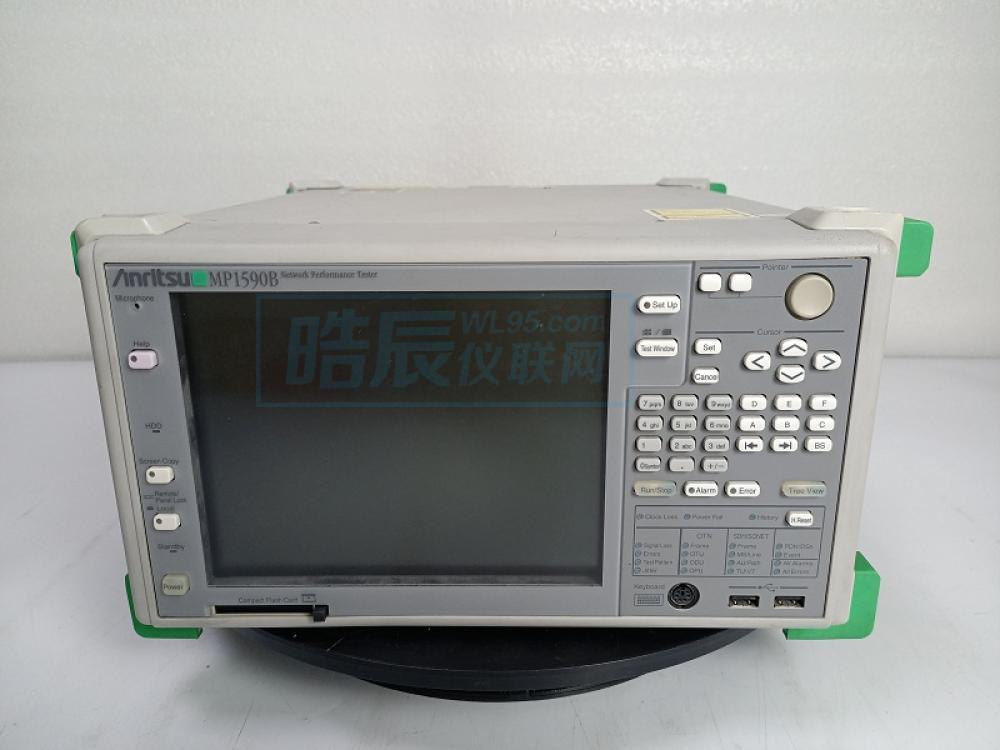
晧辰团队专业维修,品质保障!!!专业维修 安立 Anritsu MP1590B 网络性能分析仪,其常见的故障及原因分析如下:
故障点:仪表无法开机或开机无显示
原因分析: 仪表背面的主电源开关未打开,或正面Power开关接触不良;电源模块故障或电源线连接异常;内部主板、系统软件因突然断电或硬盘损坏导致启动失败。
故障点:光接口无激光输出
原因分析: 未安装或未正确开启仪表光口开关附带的“安全钥匙(Key)”及“远程互锁(Remote Interlock)”装置;光模块硬件损坏或老化。
故障点:无法建立测试连接或仪表不识别测试模块
原因分析: 未按要求正确连接仪表侧面的7根内部同轴电缆;可插拔测试模块未安装牢固或模块本身故障;软件IP地址设置错误(Windows IP与Unit IP未设在同一网段)导致通信失败。
故障点:测量读数异常(如误码过多、功率不准)
原因分析: 仪表内部基准时钟源或模块内部校准参数漂移;光衰减器或接收电路性能下降;仪表长期未进行外部计量校准。
故障点:系统软件运行缓慢、死机或通信接口(GPIB/USB/LAN)失灵
原因分析: 内置Windows XP系统运行缓慢或感染病毒;硬盘存储空间不足或存在坏道;通信接口驱动异常,或接口物理芯片因静电、浪涌而损坏。
故障点:按键失灵或显示屏故障
原因分析: 前面板按键因频繁使用导致物理磨损或接触点氧化;显示屏排线松动、接触不良,或显示屏本身老化损坏。
通过了解设备的常见故障,您可以更好地维护和使用它,确保其长期稳定运行。若无法解决,欢迎联系晧辰!我们的维修团队拥有丰富的实战经验和专业的维修流程,可为您提供快速、可靠、优质的维修服务!
Haochen Team Professional Repair, Quality Assurance!!! We professionally repair Anritsu MP1590B Network Performance Analyzer. Its common failures and cause analysis are as follows:
Failure Point: The instrument fails to power on or shows no display
Cause Analysis: The main power switch on the rear panel is not turned on, or the front Power switch has poor contact; power module failure or abnormal power cable connection; the internal motherboard or system software fails to boot due to sudden power loss or hard disk damage.
Failure Point: No laser output from the optical interface
Cause Analysis: The attached safety "Key" and "Remote Interlock" devices for the optical port switch are not installed or not correctly turned on; optical module hardware failure or aging.
Failure Point: Failure to establish a test connection or the instrument does not recognize the test module
Cause Analysis: The 7 internal coaxial cables on the side of the instrument are not correctly connected as required; the plug-in test module is not securely installed or is faulty itself; incorrect software IP address settings (Windows IP and Unit IP are not in the same subnet) leading to communication failure.
Failure Point: Abnormal measurement readings (e.g., excessive bit errors, inaccurate power)
Cause Analysis: Drift of the internal reference clock source or module internal calibration parameters; performance degradation of the optical attenuator or receiver circuit; the instrument has not undergone external metrological calibration for an extended period.
Failure Point: System software runs slowly, freezes, or communication interfaces (GPIB/USB/LAN) malfunction
Cause Analysis: The built-in Windows XP system runs slowly or is infected with viruses; insufficient hard disk storage space or bad sectors; communication interface driver abnormalities, or physical damage to the interface chip due to electrostatic discharge or power surges.
Failure Point: Unresponsive keys or display failure
Cause Analysis: Physical wear or oxidation of contact points on front panel keys due to frequent use; loose display ribbon cables, poor contact, or aging and damage to the display itself.
By understanding the common failures of the equipment, you can better maintain and use it to ensure its long-term stable operation. If the problem cannot be resolved, please feel free to contact Haochen! Our repair team has rich practical experience and a professional repair process, and can provide you with fast, reliable, and high-quality repair services!



Copyright © 2007 All Rights Reserved. 深圳市晧辰电子科技有限公司 版权所有 [粤ICP备14101712号-1] [法律顾问]
公司地址:广东省深圳市南山区西丽街道官龙村华纵科技楼5楼 邮编:518055